Create a Program to Implement Screening Method in Python Assignment Solution

- Instructions
- Objective
- Requirements and Specifications
Instructions
Objective
Write a python assignment program to implement screening method
Requirements and Specifications
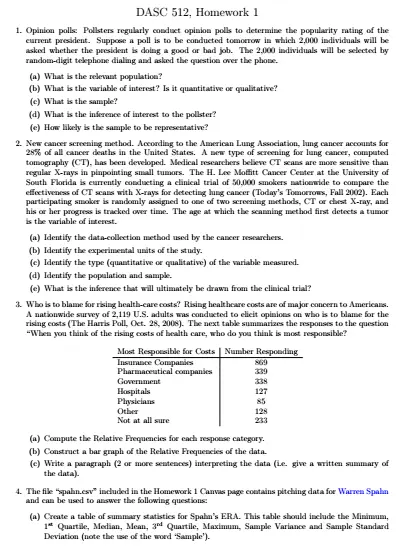
Source Code
#**4.**

 import pandas as pd

 # reading and converting the data ito pandas Dataframe

 data = pd.read_csv("spahn.csv")

 # applaying pandas method .describe()

 data.describe().T

 import pandas as pd

 # reading and converting the data ito pandas Dataframe

 data = pd.read_csv("spahn.csv")

 # applaying pandas method .describe()

 data[['ERA+']].describe()

data[['SO']].boxplot()

data[['ERA']].boxplot()

data[['ERA+']].boxplot()

#**5.**

data = pd.read_csv('d5000.csv')

data.head()

data.describe()

data.plot.scatter(x = 'HR', y = 'SO')

#**6.**

data = pd.read_csv('hofbatting.csv')

data.head()

data.describe().T

import numpy as np

data = pd.read_csv('hofbatting.csv')

mid_career_keys  = ['19 th Century', 'Dead Ball', 'Lively Ball',

 'Integration', 'Expansion', 'Free Agency', 'Long Ball']

mid_career_values = []

for row in data[['From', 'To']].values:

 From, To  = row[0], row[1]

 #up to the 1900 Season

 if To <= 1900:                    mid_career_values.append(mid_career_keys[0])

 #1901 through 1919

 elif From > 1900 and To <= 1919:  mid_career_values.append(mid_career_keys[1])

 #1920 through 1941

 elif From > 1920 and To <= 1941:  mid_career_values.append(mid_career_keys[2])

 #1942 through 1960

 elif From > 1942 and To <= 1960:  mid_career_values.append(mid_career_keys[3])

 #1961 through 1976

 elif From > 1961 and To <= 1976:  mid_career_values.append(mid_career_keys[4])

 #1977 through 1993

 elif From > 1977 and To <= 1993:  mid_career_values.append(mid_career_keys[5])

 #after 1993

 elif From > 1993:                 mid_career_values.append(mid_career_keys[6])

 else:

 mid_career_values.append('not-labled')

data['mid-career'] = mid_career_values

data.head()

data.groupby('mid-career')['mid-career'].value_counts()

data.groupby('mid-career').sum()

hist = data['mid-career'].hist()

data.plot.scatter(x = 'OBP', y = 'SLG')

OPS_values = []

for row in data[['OBP', 'SLG']].values:

 OPS_values.append(row[0] + row[1])

data['OPS'] = OPS_values

data.columns

data[['OBP', 'SLG', 'OPS']].head()

data['OPS'] = (data['OPS'] - data['OPS'].mean())/data['OPS'].std(ddof=0)

data['OPS'].head()

data.plot.scatter(x = 'OPS', y = 'mid-career')

HR_AB_values = []

for row in data[['HR', 'AB']].values:

 HR_AB_values.append(row[0] + row[1])

data['HR/AB'] = HR_AB_values

data['HR/AB']

df=data.groupby('mid-career')['HR/AB']

df.describe()

data.boxplot()
Similar Samples
Explore our curated selection of programming assignment samples at ProgrammingHomeworkHelp.com. From Java and Python to C++ and assembly language, these examples illustrate our commitment to delivering clear, efficient, and well-structured code solutions. Perfect for students seeking guidance and inspiration for their programming projects.
Python
Python
Python
Python
Python
Python
Python
Python
Python
Python
Python
Python
Python
Python
Python
Python
Python
Python
Python
Python